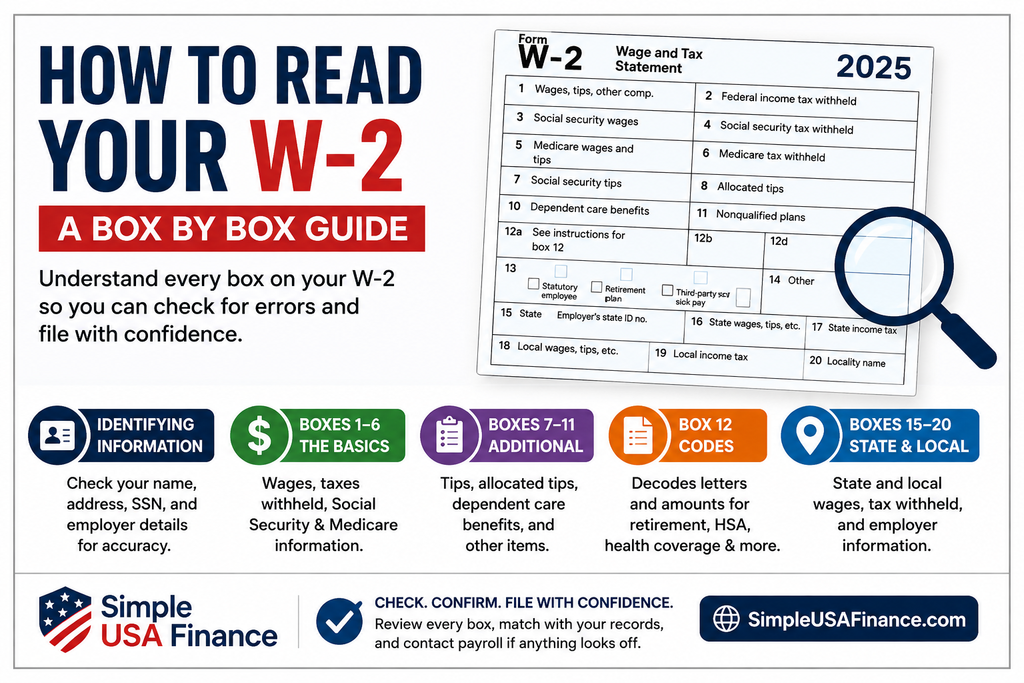
Learning how to read your W-2 line by line is the fastest way to catch errors before you file and understand exactly where your tax refund or tax bill comes from. Your W-2 looks crowded, but once you know what each numbered box means, it takes about two minutes to check. This guide walks through how to read your W-2 line by line using the current form for the 2025 tax year, the one most people received in January 2026.
How to Read Your W-2 Line by Line: Start With the Identifying Boxes
Before the numbered boxes, your W-2 lists your employer’s name, address, and Employer Identification Number, along with your name, address, and Social Security number. Confirm your Social Security number is correct here first. A single wrong digit can delay your refund or cause the IRS to flag your return.
Once those details check out, you are ready to move into the actual dollar figures, which is where most people actually want help learning how to read your W-2 line by line. Getting the identifying information right first also makes the rest of how to read your W-2 line by line go faster, since you will not need to double back later.
How to Read Your W-2 Line by Line: Boxes 1 Through 6
Box 1 shows your total taxable wages, tips, and other compensation for the year. This number is usually lower than your actual salary because it excludes pretax deductions like traditional 401(k) contributions and health insurance premiums. Box 2 shows the federal income tax your employer already withheld from those wages.
Box 3 reports your Social Security wages, which can differ from box 1 because retirement contributions still count toward Social Security even though they are excluded from box 1. For the 2025 tax year, Social Security wages in box 3 cannot exceed $176,100, the Social Security Administration’s wage base for that year. Box 4 is the Social Security tax actually withheld, capped at $10,918.20 for 2025.
Box 5 shows Medicare wages, which have no annual cap, and box 6 shows Medicare tax withheld at 1.45%, plus an extra 0.9% on wages above $200,000. Together, boxes 1 through 6 are the core of how to read your W-2 line by line for most filers. If you only check five things on your form this year, checking boxes 1 through 6 against your final pay stub is the fastest version of how to read your W-2 line by line.
How to Read Your W-2 Line by Line: Boxes 7 Through 11
Boxes 7 through 11 apply mainly to tipped employees, allocated tips, and certain deferred compensation or dependent care benefits. Box 7 reports Social Security tips, box 8 reports allocated tips your employer estimated rather than tracked directly, and box 10 reports dependent care benefits provided through a workplace flexible spending account.
If these boxes are blank on your form, that usually just means they do not apply to your situation. Not every part of how to read your W-2 line by line involves every box, and that is normal for most non tipped employees.
How to Read Your W-2 Line by Line: Decoding Box 12
Box 12 is where most confusion happens, and it is usually the trickiest step in how to read your W-2 line by line. It uses one or two letter codes, each paired with a dollar amount, to report specific items like retirement contributions, HSA contributions, and the cost of employer sponsored health coverage. Code D typically reports traditional 401(k) contributions, code W reports employer and employee HSA contributions, and code DD reports the total cost of your health coverage, which is informational and not taxable to you.
The IRS General Instructions for Forms W-2 and W-3 list every current code and what it means. Checking box 12 against your own pay stub records is one of the more useful steps in how to read your W-2 line by line, since these codes explain why box 1 is often smaller than your gross pay.
How to Read Your W-2 Line by Line: State and Local Boxes 15 Through 20
Boxes 15 through 20 cover state and local taxes. Box 15 lists your employer’s state and state ID number, box 16 shows state wages, and box 17 shows state income tax withheld. If you worked in more than one state during the year, your W-2 may list multiple rows here.
Boxes 18 through 20 repeat that same structure for local taxes, such as city or school district withholding, where applicable. This part of how to read your W-2 line by line matters most if you moved, worked remotely across state lines, or lived in a city with its own income tax. Multi state workers should slow down here, since this step of how to read your W-2 line by line is the one most likely to have more than one line per box.
How to Read Your W-2 Line by Line: Common Mistakes to Watch For
The most common issue is a mismatch between box 1 wages and what you expected based on your salary, which is almost always explained by pretax deductions rather than an error. A genuine mistake is more often a wrong Social Security number, a misspelled name, or a Social Security wage amount in box 3 that does not match your actual pay. Spotting these issues early is the whole point of how to read your W-2 line by line before you submit your return.
Learning how to read your W-2 line by line also means knowing when to ask for a correction. If you spot an error, contact your employer’s payroll department first and ask for a corrected Form W-2c. The IRS explains the correction process if your employer does not respond in time to file.
Once you have confirmed every box, you can run your how to read your W-2 line by line numbers through our Paycheck and Withholding Calculator to estimate your refund or balance due before you file.
Bottom Line
Once you understand how to read your W-2 line by line, the form stops looking intimidating and starts working as a checklist you can verify in a few minutes each year. Match each box against your own pay records, confirm your personal information, and reach out to payroll early if anything looks off.
This is for informational purposes only and isn’t financial, tax, or legal advice.

Raghu Shekar writes about personal finance, banking, Medicare, and retirement planning at SimpleUSAFinance. His goal is simple: break down the numbers people actually need — no jargon, no sales pitch — so readers can make their own decisions with confidence. When he’s not writing, he’s usually digging through the latest rate changes, tax brackets, or Medicare updates to keep the site’s calculators and guides current.